Art
Artwork within Castle refers to the drawings, images, and animations that work together to create the visuals of a Card.
Adding and Editing Artwork
To add art, first choose the Blueprint that needs art. (If you don't have any blueprints, either add one, or try starting with a Kit.) Press Edit to open the Inspector for that blueprint. Then make sure you're on the General tab, and look for the heading labeled Artwork.
Understanding the Artwork tab
Artwork can be edited by either clicking the selected frame or selecting another frame twice. Alternatively, adding a new frame by using the + button will bring you inside the editor. The frame number is displayed on the top left; there is no maximum.
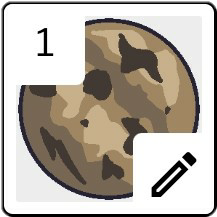

The Play When Created option determines how many times a sequence of frames will play upon creation of the actor.

Still
Still stays still at one frame, frames in this mode can be only moved using rules
Once
Once will play an animation starting from the first frame then stopping and staying at the last frame when an actor of the blueprint is created
Loop
Loop is like once but instead of stopping at the last frame it goes back to the first frame and plays again forever